Java String
Objects backed by char array
- Immutable and final Characteristics
- Immutable Benefits
- String APIs
+opreator vs StringBuilder.append() vs concat
- String & StringTokenizer & String Buffer & String Builder
- StringBuffer VS StringBuilder VS String
- A word on ‘best practice’
- Storing passwords
Immutable and final Characteristics
public class Example1 {
    public static void main(String[] args) {
        String s1 = "Hello";
        String s2 = s1.toUpperCase();
        System.out.println(s2);
    }
}
Immutable Benefits
- Use with StringPool/intern for caching(java 1.7后StringPool就不储存在MethodArea/PermGen,而是Main Heap)
public class Example1 {
    public static void main(String[] args) {
        // cashed in the string pool use string.intern()to create a string
        String s1 = "Hello";

        // now s2 will also point to the same string object in the string pool
        String s2 = "Hello";
        System.out.println("Are the same ref?" + (s1 == s2));// true

        // use constructor to create a string
        /* The string is not interned and it means jvm does not search
         string  pool for this "Hello" and assign it back to s3 */
        String s3 = new String("Hello");// new object in the heap
        System.out.println(s1 == s3); // false

        String s4 = new String("Hello").intern(); // now it is interned
        System.out.println(s1 == s4); // true

        /* 如果String是mutable的话,那么string pool中的“hello”值也会变成大写,
         从而s2(有相同的reference)的值也被修改了,这样就无法使用string pool进行缓存了*/
        s1.toUpperCase();
    }
}
- thread safe
- caches hashcodes - 有了缓存机制,每次调用hashcode方法就不需要重新计算
String APIs
- indexOf, lastIndexOf, contains, matches(for regular expression)
- regular expressions
- substring - memory leak up until JDK 7.
package exapmles;

import java.util.regex.Matcher;
import java.util.regex.Pattern;

public class Example1 {
    public static void main(String[] args) {
        String s1 = "Hello";
        String s2 = "Hello lo lo";
        System.out.println(s1.indexOf("lo")); //输出3
        System.out.println(s2.lastIndexOf("lo"));//输出9
        System.out.println(s2.contains("Hello")); //输出true

        String s3 = "Hello world";
        // anything followed by "word"
        System.out.println(s3.matches("(.) world")); //输出true

        //Regex
        //Count matches of a specific substring in a string
        String s4 = "hellofafshellofafsdfhellofadf";
        Pattern pattern = Pattern.compile("hello");
        Matcher matcher = pattern.matcher(s4);
        int occurances = 0;
        while (matcher.find()){
            occurances++;
        }
        System.out.println(occurances); //输出3

        String s5 = "sfjslkdfjskfjjflkasjflksfjlkd";
        System.out.println(s5.substring(5, 8));

        //System.out.println(s5.substring(50)); //报错:IndexOutOfBoundException
        System.out.println(s5.substring(s5.length())); // 输出为空

        //before java 1.7 substring - source of memory leak
        // 主要原因在String构造方法,改进后使用copyof
        String s6 = s5.substring(5, 8);
        System.out.println(s6);
    }
}
+ opreator vs StringBuilder.append() vs concat
package examples;

public class Example1 {
    public static void main(String[] args) {
        // There used to produce a lot of intermediate strings. Less efficient in terms of memory execution
        // Nowadays the jvm itself will invoke StringBuilder.append() to concat string
        String s = "This "+20+" is "+Boolean.valueOf(true);
        new StringBuilder("This").append(20).append(true);
        // 以上执行的两个操作相同
        System.out.println(s);

        // concat
        String s1 = "ab ";
        String s2 = " cd";
        System.out.println(s1.concat(s2)); //输出ab cd
        // main difference: the concat operation only visit string type.
        // small amount of strings concat use concat can be more efficient.
        // large amount of strings use StringBuilder
    }
}
Take a look how implement:
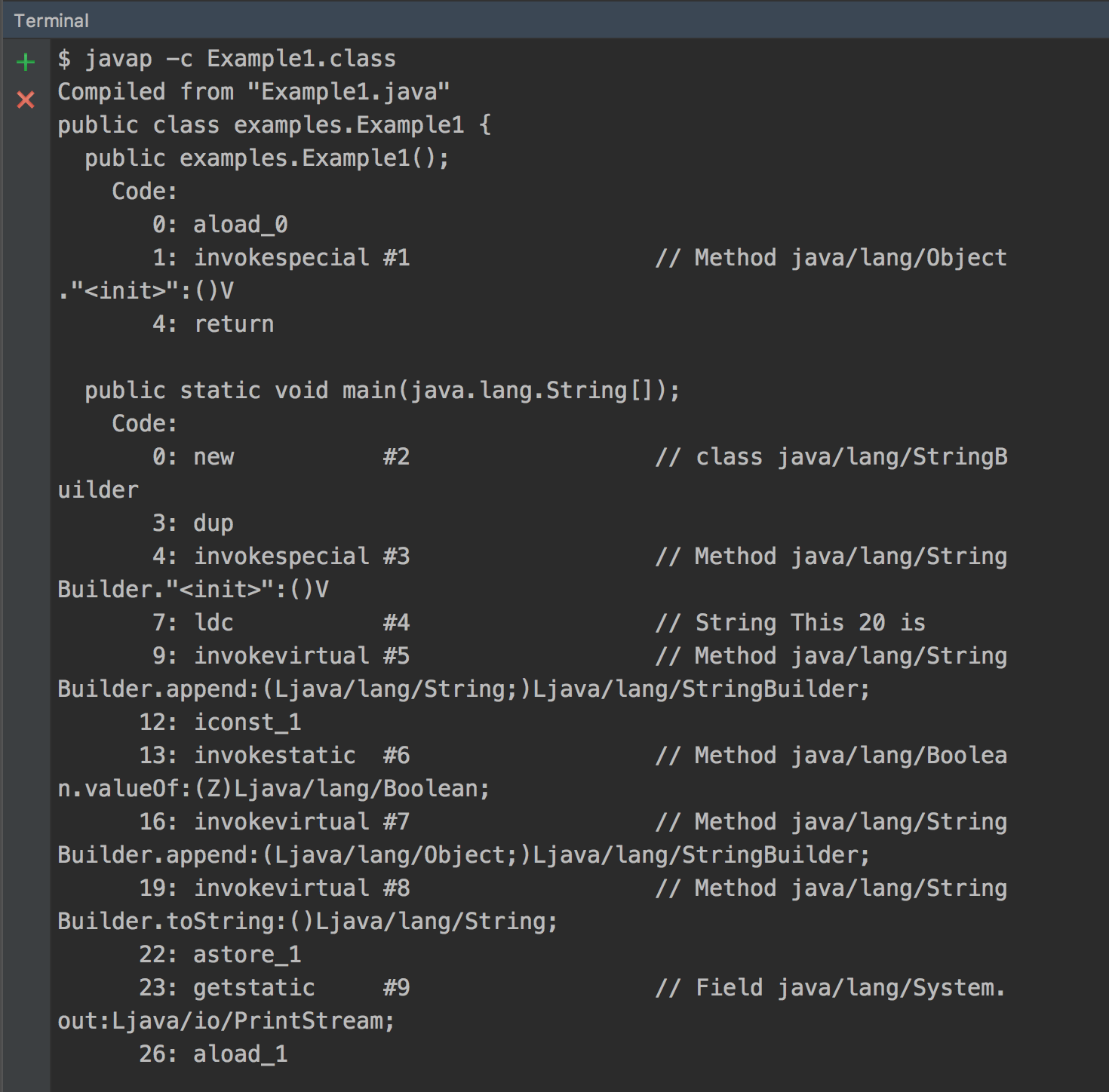 可见JVM会自己调用StringBuilder.append()方法去拼接字符串。
String & StringTokenizer & String Buffer & String Builder
- String字符串常量
- StringBuffer字符串变量(线程安全)
- StringBuilder字符串变量(线程不安全)
- StringTokenizer(废弃不用)
String
作为常量,String对象是不可变的,具有只读特性,所以任何引用都不可能改变它的值。String类中每一个看起来会修改String值的方法,实际上都是创建一个全新的对象,以包含修改后的字符串内容,而最初的String对象则丝毫不动。经常改变内容的字符串不要使用String,因为每次生成对象都会对系统性能产生影响,当内存中无引用对象对了,JVM的GC就会开始工作,从而造成速度很慢。
StringBuffer
作为变量,StringBuffer类的对象能够被多次的修改,并且不产生新的未使用对象。所以当字符串需要经常变化的话,例如重载“+” ,推荐使用 StringBuffer。
StringBuilder
它与StringBuffer类功能基本类似,区别在于StringBuffer是线程安全的(能同步访问),而StringBuilder不是,但是StringBuilder 相较于 StringBuffer 有速度优势,所以多数情况下建议使用 StringBuilder 类。然而在应用程序要求线程安全的情况下,则必须使用 StringBuffer 类。
StringTokenizer
在Java引入正则表达式(J2SE1.4)和Scanner类(Java SE5)之前,分割字符串的唯一方法是使用StringTokenizer来分词。使用正则表达式过Scanner对象,我们能以更加复杂的模式来分割一个字符串,而这对于StringTokenizer来说就很困难了。基本上,我们可以放心的说,StringTokenizer已经可以废弃不用了。
StringBuffer VS StringBuilder VS String
- StringBuffer/StringBuilder are similar to string except mutable
- StringBuffer is synchronized implememtation that means every method in StringBuffer has a synchronized key word on its public api, and StringBuilder is not.
- String buffer is thread-safe implementation, and String builder is not.
A word on ‘best practice’
public class Example1 {
    static final String SUCCESS = "success";

    public static void main(String[] args) {
        String s = someOperation();
        if (s.equals(SUCCESS)) {
            System.out.println("Operation was successful");
        } else {
            System.out.println("Operation failed");
        }
    }

    private static String someOperation() {
        return null;
    }
}
运行结果:

Instead:
package examples;

public class Example1 {
    static final String SUCCESS = "success";

    public static void main(String[] args) {
        String s = someOperation();
        if (SUCCESS.equals(s)) { // if(s !=null && s.equals(SUCCESS)
            System.out.println("Operation was successful");
        } else {
            System.out.println("Operation failed");
        }
    }

    private static String someOperation() {
        return null;
    }
}
Storing passwords
String is not the best way to store password, instead use char[], because string is created in the string pool, and they are maintain for certain period because they are cached for certain period. So use char[] to store password and then set the char[] back to null or store elements to char[] to zeros. So the actual value get gc collecteds