MetalLB Investigate
- Load Balancer
- External LB
- Service LB
- MetalLB
- Mode 1 - ARP
- Mode 2 - BGP
- Install & Configuraration
- Conclusion
Load Balancer
External LB
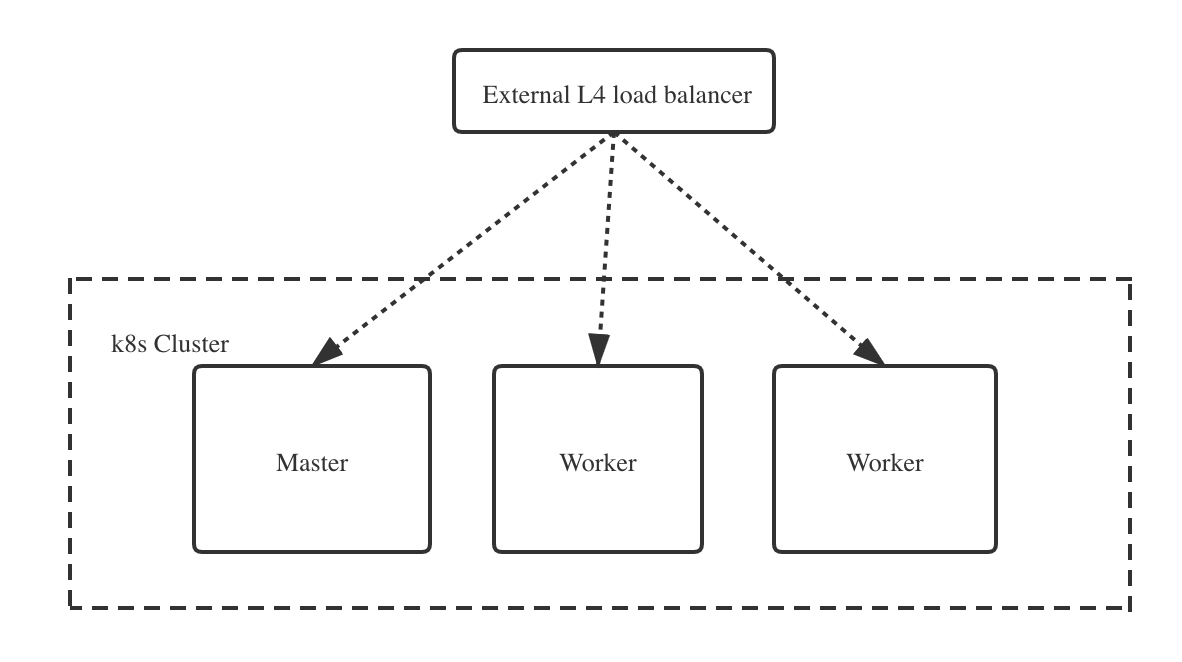 Benefits:
- SSL termination
- Health checks
- Enables node mantenance
- Reduce downtime
Options:
- Cloud provider solution
- Something commercial
- HAProxy
- Nginx
- Apache
- Multi-node w/ keepalived
Service LB
On-prem installed k8s doesn’t support LoadBalancer type service.

Service LB Features:
- Provisions provider LB
- Connects LB to NodePort
- Provider-specific
- Layer 4 only
Service LB Requirements:
- Cluster configuration
- Node configuration
- Policy configuration
- Cloud-provider support
MetalLB
MetalLB is a load-balancer implementation for bare metal Kubernetes clusters, using standard routing protocols.
Prerequisites:
- Multiple IPs per node
- Dynamic IP assignment
- Layer2 or BGP support
Mode 1 - ARP
OSI layer2 router protocol - Address Resolution Protocol
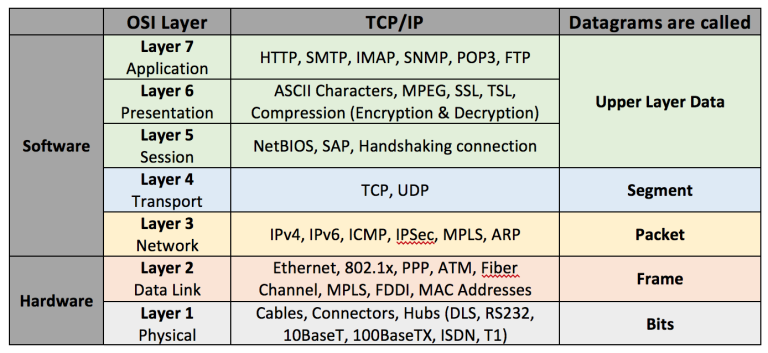
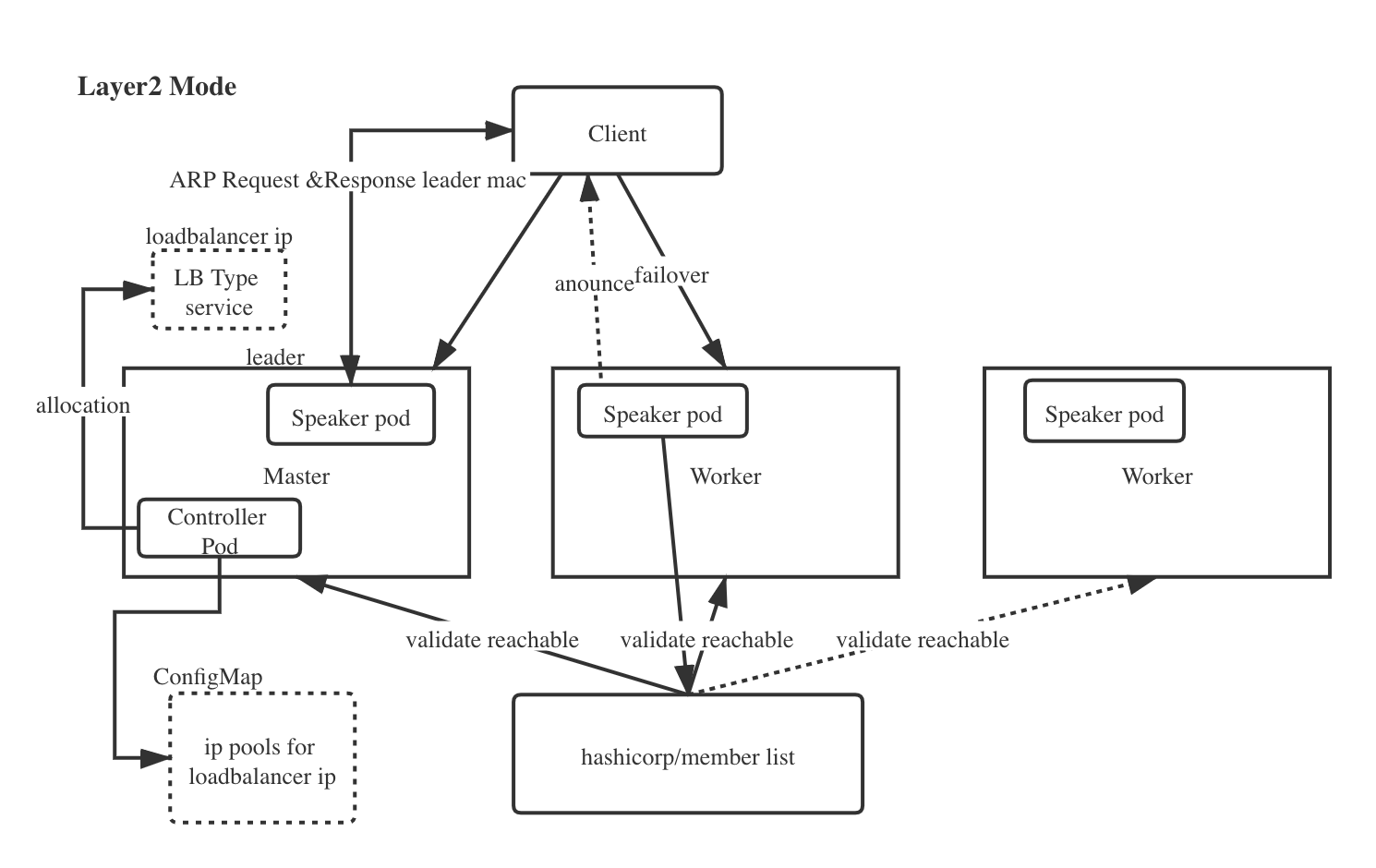
- ARP: Layer 2 mode does not require the IPs to be bound to the network interfaces of your worker nodes. It works by responding to ARP requests on your local network directly, to give the machine’s MAC address to clients.
- SSH into one or more of your nodes and use arping and tcpdump to verify the ARP requests pass through your network. We found out that the IP 192.168.1.240 is located at the mac FA:16:3E:5A:39:4C.
- Pros:
- Universality - Work on any ethernet network, with no special hardware required, not even fancy routers;
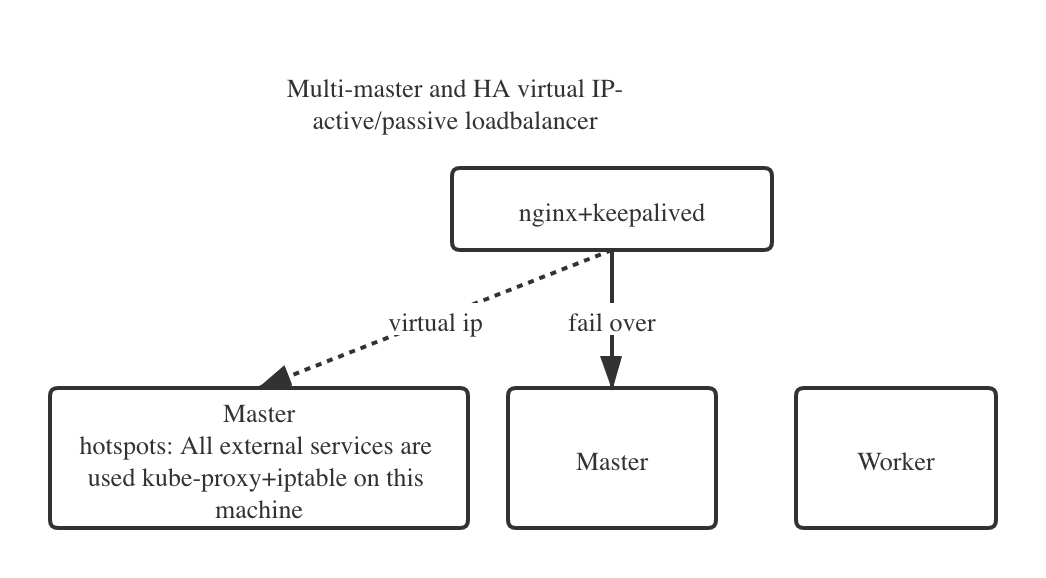
- Similar failover mechanism of Keeplived, but more robust(All nodes in cluster involved) and more flexible(Support select nodes by label). Although not perfectly even load balancing,one node serve multiple external Services instead of all Services someway can ease the hotspot problem.
- Cons:
- Failover mechanism only thus single-node bottlenecking exists or potentially slow failover(based on the system)
Mode 2 - BGP
Border Gateway Protocol
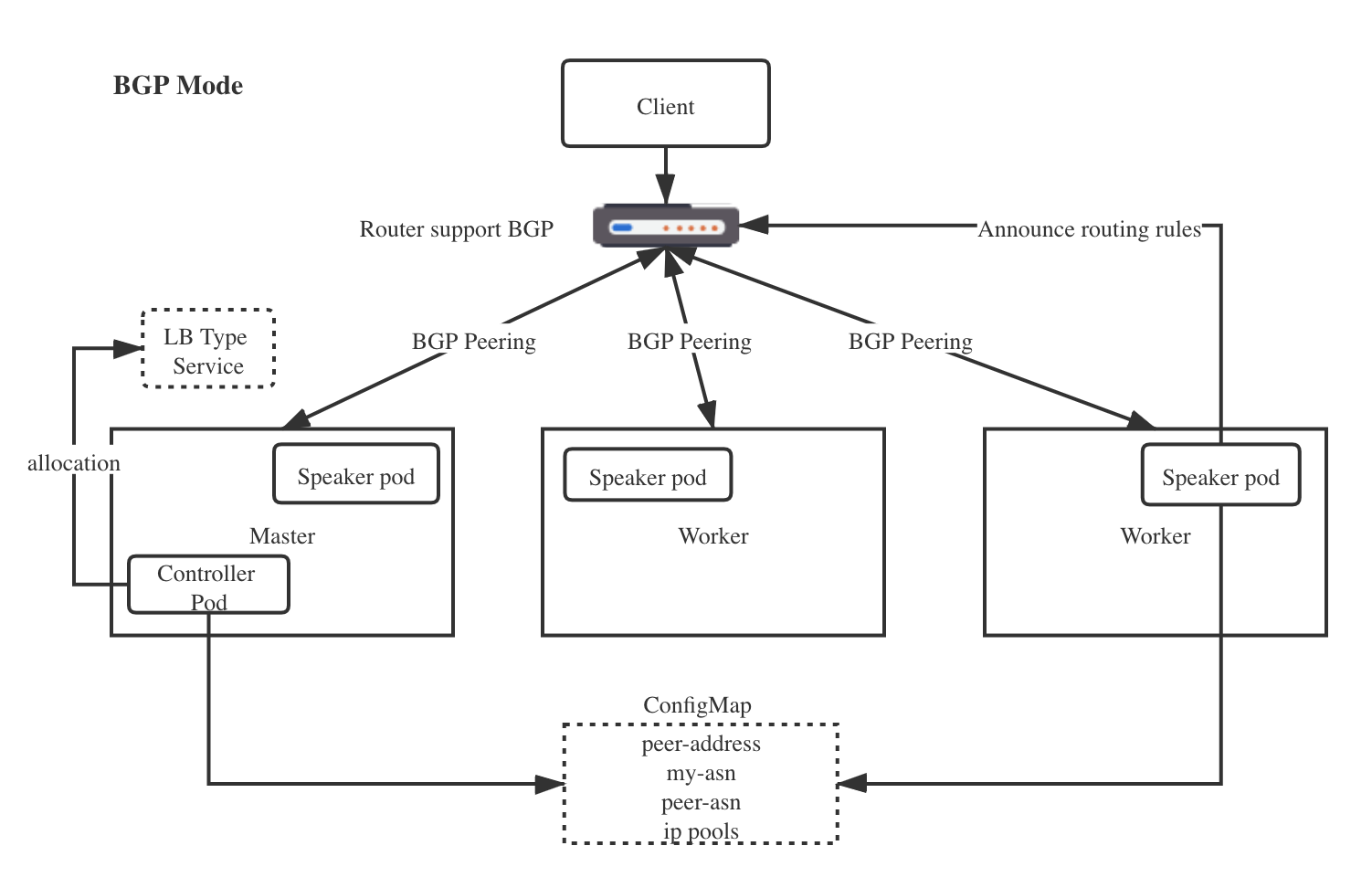
- Prerequisite - network routers support BGP and routers are configured to support multipath.
- Pros
- Per-connection means that all the packets for a single TCP or UDP session will be directed to a single machine in your cluster. not for packets
- Use standard router hardware, rather than bespoke load-balancers.
- Using BGP allows for true load balancing across multiple nodes, and fine-grained traffic control thanks to BGP’s policy mechanisms.
- Cons
- Hardware dependent - BGP infrastructure(Routers hardware support BGP) required
- The biggest is that BGP-based load balancing does not react gracefully to changes in the backend set for an address.
- Your BGP routers might have an option to use a more stable ECMP hashing algorithm. This is sometimes called “resilient ECMP” or “resilient LAG”. Using such an algorithm hugely reduces the number of affected connections when the backend set changes.
Configure BGP Peering:
R1#show ip bgp summary
BGP router identifier 192.168.143.2, local AS number 64500
BGP table version is 23, main routing table version 23
1 network entries using 144 bytes of memory
1 path entries using 80 bytes of memory
1/1 BGP path/bestpath attribute entries using 136 bytes of memory
0 BGP route-map cache entries using 0 bytes of memory
0 BGP filter-list cache entries using 0 bytes of memory
BGP using 360 total bytes of memory
BGP activity 5/4 prefixes, 13/12 paths, scan interval 60 secs

Neighbor        V          AS    MsgRcvd MsgSent   TblVer InQ OutQ  Up/Down  State/PfxRcd
192.168.121.72  4        64500       2       4       23    0    0   00:00:24        0
192.168.121.170 4        64500       2       5       23    0    0   00:00:24        0
192.168.121.224 4        64500       2       4       23    0    0   00:00:24        0
Speaker use BGP to advertise routing rules:
R1#show ip route bgp
Codes: L - local, C - connected, S - static, R - RIP, M - mobile, B - BGP
       D - EIGRP, EX - EIGRP external, O - OSPF, IA - OSPF inter area
       N1 - OSPF NSSA external type 1, N2 - OSPF NSSA external type 2
       E1 - OSPF external type 1, E2 - OSPF external type 2
       i - IS-IS, su - IS-IS summary, L1 - IS-IS level-1, L2 - IS-IS level-2
       ia - IS-IS inter area, * - candidate default, U - per-user static route
       o - ODR, P - periodic downloaded static route, H - NHRP, l - LISP
       + - replicated route, % - next hop override

Gateway of last resort is not set

      192.168.143.0/32 is subnetted, 1 subnets
B        192.168.143.230 [200/0] via 192.168.121.224, 00:00:15
                         [200/0] via 192.168.121.170, 00:00:15
                         [200/0] via 192.168.121.72, 00:00:15
The main difference from the user’s point of view between the two is that the ARP solution requires each node to be in a single L2 network (subnet), while BGP requires dynamic routing configuration on the upstream router.
Install & Configuraration
kubectl apply -f https://raw.githubusercontent.com/metallb/metallb/v0.9.5/manifests/namespace.yaml
kubectl apply -f https://raw.githubusercontent.com/metallb/metallb/v0.9.5/manifests/metallb.yaml
# On first install only
kubectl create secret generic -n metallb-system memberlist --from-literal=secretkey="$(openssl rand -base64 128)"
apiVersion: v1
data:
  config: |
    address-pools:
    - name: default
      protocol: layer2
      avoid-buggy-ips: true
      addresses:
      - 16.186.72.2-16.186.79.254
kind: ConfigMap
metadata:
  creationTimestamp: "2020-10-14T17:25:12Z"
  managedFields:
  - apiVersion: v1
    fieldsType: FieldsV1
    fieldsV1:
      f:data:
        .: {}
        f:config: {}
    manager: kubectl
    operation: Update
    time: "2020-10-18T10:41:56Z"
  name: config
  namespace: metallb-system
  resourceVersion: "912253"
  selfLink: /api/v1/namespaces/metallb-system/configmaps/config
  uid: ce9d1583-8bc8-47b0-978f-547d08e20a98
apiVersion: v1
data:
  config: |
    peers:
    - peer-address: 16.186.72.1
      peer-asn: 64501
      my-asn: 64500
    address-pools:
    - name: default
      protocol: bgp
      avoid-buggy-ips: true
      addresses:
      - 192.168.122.1/24
kind: ConfigMap
metadata:
  creationTimestamp: "2020-10-14T17:25:12Z"
  managedFields:
  - apiVersion: v1
    fieldsType: FieldsV1
    fieldsV1:
      f:data:
        .: {}
        f:config: {}
    manager: kubectl
    operation: Update
    time: "2020-10-18T10:41:56Z"
  name: config
  namespace: metallb-system
  resourceVersion: "912253"
  selfLink: /api/v1/namespaces/metallb-system/configmaps/config
  uid: ce9d1583-8bc8-47b0-978f-547d08e20a98
Conclusion
- For maturity Consideration, although metallb currently is in beta stage thus cannot use in production, but we can using it for the local environment for testing due to its usability!
- Where metallb really shines is when you put an ingress controller behind it. By putting the ingress controller behind metallb you have metallb responsible for keeping the address alive and then it routes traffic directly to the cluster ip service for the ingress controller.